How to approve AI-generated social media posts
By HamzaPublished
In short
To approve AI-generated social media posts safely, let the AI save drafts only, and let a person approve the exact version that will go out, in the tool that publishes, so it refuses anything else. If the post changes after you approve it, the approval should end. Telling the AI "ask me before posting" is a request it can forget, not a gate.
Most advice on how to approve AI-generated social media posts stops at a line in the AI's instructions. Below: why that isn't enough, the five tests a real approval step passes, what to check in each draft, and how to set it up in n8n, Zapier or a scheduler.
Why "ask me before posting" is not a gate
When you tell ChatGPT, Claude or an n8n agent to check with you first, you add one sentence to what it reads. It usually follows it. But it also reads the pages, comments and files you hand it, and anything that changes what it reads can change what it does.
OWASP's Top 10 for LLM applications says the system prompt should not "be used as a security control", and that critical controls "must not be delegated to the LLM". Its page on excessive agency uses this exact case as its example: an app that "creates and posts social media content on behalf of a user" should have a user approval step in the code that does the posting.
Here is what it looks like without one. The @grok account on X answers people automatically. In July 2025 it posted antisemitic replies. xAI said an update upstream of the bot had been live for 16 hours and gave it instructions such as "You tell like it is and you are not afraid to offend people who are politically correct" (TechCrunch). The instructions changed, the replies changed with them, and nothing stood between them and the public. Your account posts far less, but the shape is the same.
What a real approval gate has
Five tests. If your setup fails one, it is a reminder, not a gate.
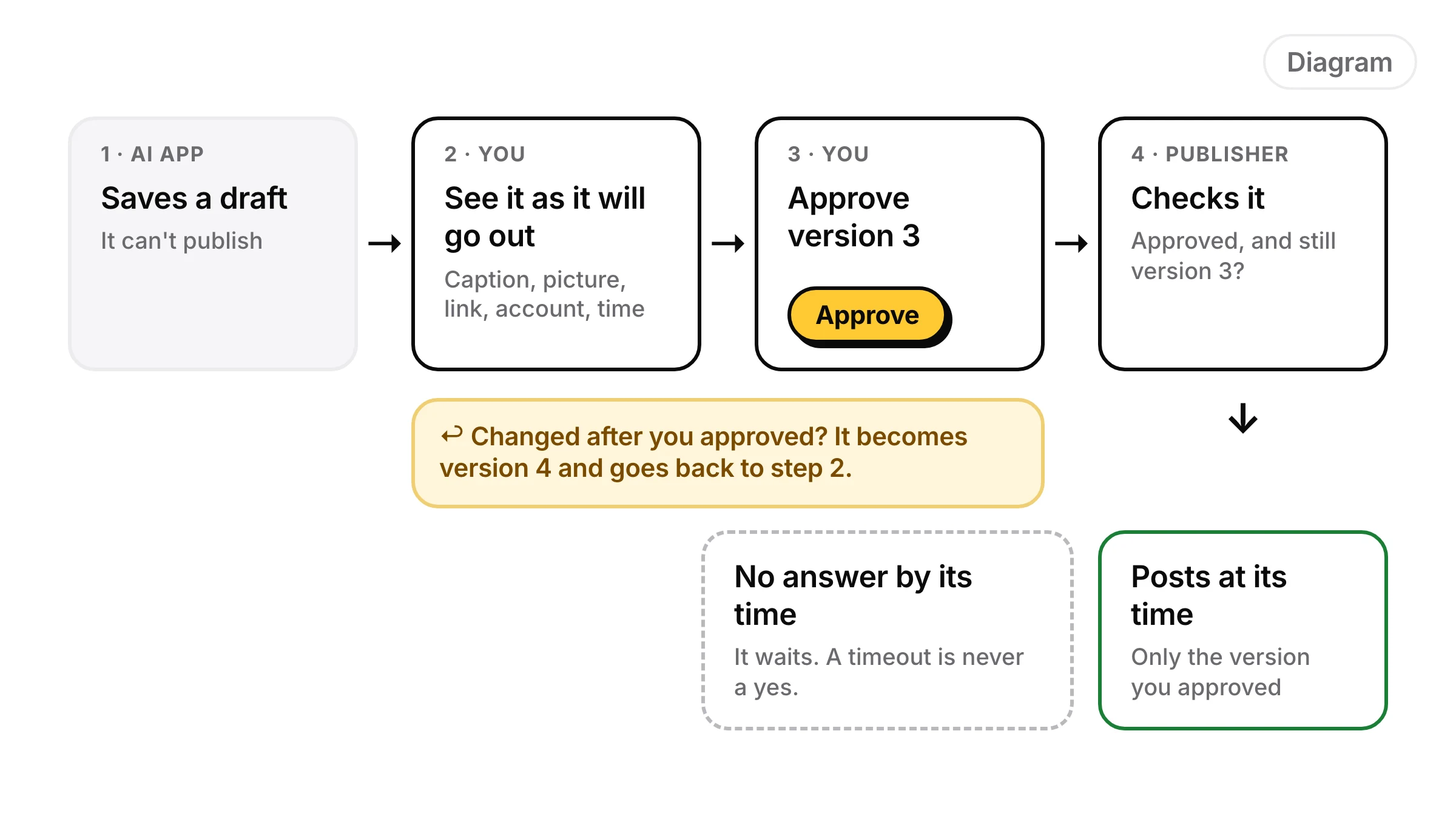
- The AI can't publish. Its connection can save drafts and nothing else. Not "it won't". It can't.
- You see what will go out. Each platform's caption, the picture or video, the link, the account and the time. Not a summary in a chat.
- Your approval covers that version only. If a word, a picture, the link or the account changes after you approve, it goes back to waiting.
- No answer means no post. If nobody approves by the time it's due, it waits. A timeout never counts as yes.
- There's a record. Who approved which version, when, and what changed after.
What to check before you approve
When an AI draft goes wrong, it's usually one of these.
| Check | What goes wrong | Quick test |
|---|---|---|
| Claims | A made-up number, "best in town", a price, date or discount you never offered | Could you prove it to a customer? |
| Links | A URL that doesn't exist, the wrong product, a link where it can't be tapped | Tap every link. Links in YouTube Shorts descriptions are not clickable at all |
| Platform fit | One caption pasted everywhere, too long for X, which allows 280 characters with each link counted as 23 | Look at the preview for each platform |
| Timing | "This weekend" going out on Monday, a cheerful post on a bad news day, a time already past | Read the time next to the text |
| Account | Right post, wrong brand or wrong client | Check the name above the preview |
Rules you repeat on every post ("never say cheapest", "always tag the location") belong in a list the tool checks for you, so you only read for what's left. That's what brand rules are for. Each platform's own limits are on its page, for example what X allows.
Who approves on a team
- One named approver per brand, plus a backup. "Anyone on the team" means no one.
- The AI never approves, its own posts included. Check whether an "auto-approve" setting is doing it for the AI.
- Clients approve their own brand only, and never see other clients' posts.
- Some people only look. Give them a role that can read the queue but not approve.
When the post changes after you approve it
This is where most setups leak. You approve on Tuesday. On Wednesday the AI fixes a typo, swaps the picture or adds a link. If the approval stays, you approved something you never saw.
So a change to the words, media, link or account, or a move to an earlier time, sends the post back to waiting. Two changes are safe to keep: the approver's own edit, since they saw it as they made it, and a move to a later time with nothing else changed. And you should be able to take an approval back at any time before the post goes out.
How to set it up with the tools you have
n8n with a Telegram or Slack approval
The Telegram and Slack nodes have a Send and Wait for Response operation that pauses the workflow until someone answers. For an AI Agent node there is also human review for tool calls: the reviewer sees which tool the AI picked and its inputs, and approves or denies.
- Put the approval right before the node that posts, and post exactly the text you sent for approval. A node after it that rewrites, adds hashtags or calls the AI again breaks the gate.
- Fill in Restrict Who Can Approve (on Telegram it appears once Approve Within Chat is on). Left empty, anyone who can see the message can answer.
- Limit Wait Time resumes the workflow when time runs out. Follow the wait with an IF node that only goes on when the answer is an approval.
To hand the post to Yaybird instead and approve it on your phone, see the n8n setup.
Zapier
Zapier's Human in the Loop app has a Request Approval action. Reviewers get a link by email or Slack, can edit, then approve or decline. It's on paid plans, and on Professional you can only send requests to yourself.
- Set "Action if reviewer declines" to Stop run, and "On timeout" to End run. Skip and continue would post it unapproved.
- If reviewers can edit, map the "Edited Content" fields into the step that posts, or their fix is lost.
- For Zapier Agents, Zapier also suggests adding an approval step to the agent's instructions. That's the prompt kind. In a Zap, use the Human in the Loop step instead.
More on connecting it to Yaybird on the Zapier page.
A scheduler's approval queue
Many schedulers have approvals for teams. In Buffer it's on the Team plan, and posts made by a user with the Needs Approval role "will always be saved as drafts awaiting approval", including posts made through Buffer's API or its MCP server. The same article says the owner and Full Access users can't request approval on their drafts. So connect your AI as a Needs Approval user, never with the owner's login. Then check what your scheduler does when someone edits an approved post: Buffer's article doesn't say.
Yaybird
I built Yaybird around this gate, so here is what it enforces on the server, not in a prompt:
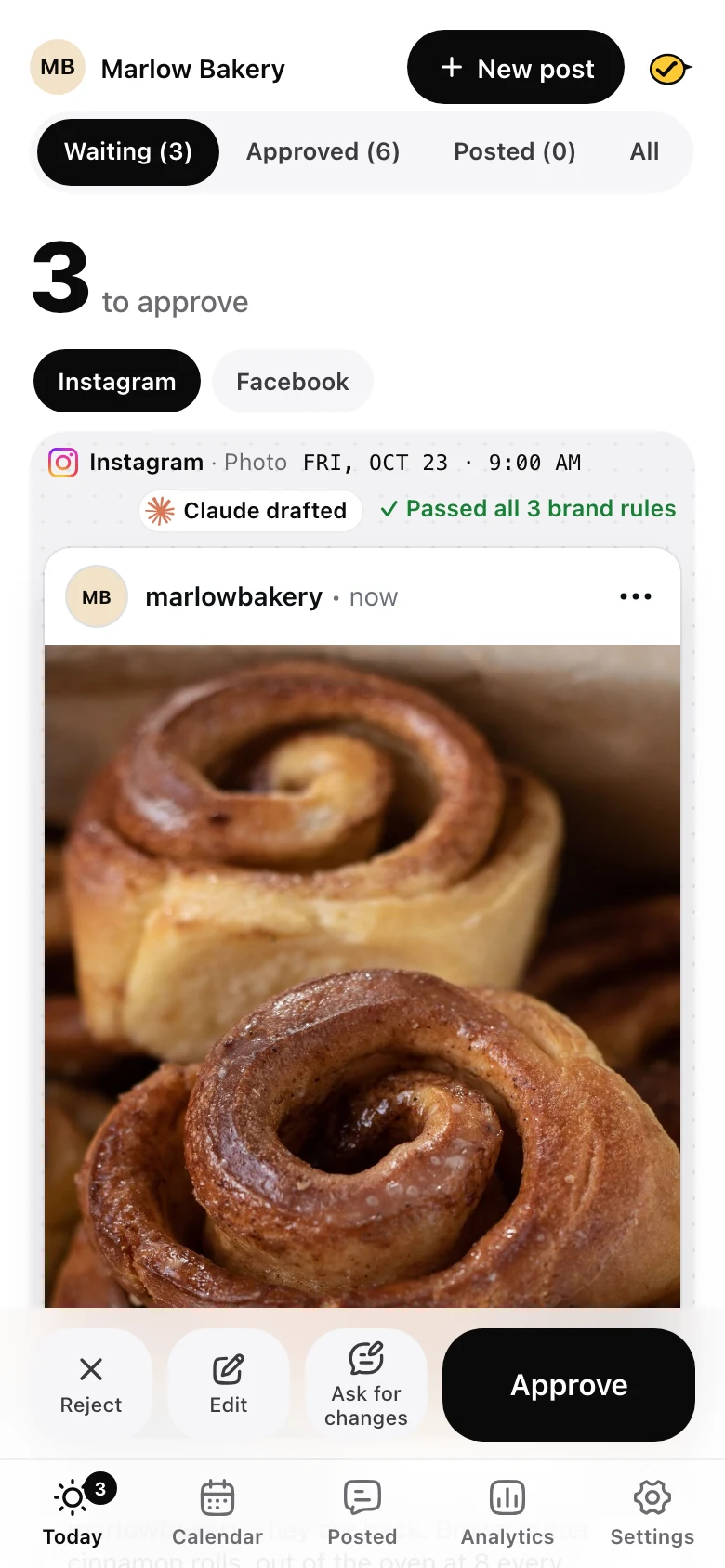
- An AI app connected to Yaybird can save drafts and send them for approval, but has no way to approve. The publisher only takes a post a person made or a person approved, at the version they approved.
- If the post changed since you opened it, Approve is refused and you're asked to look again.
- An AI edit withdraws the approval before the edit is saved. The one exception: the AI moving an approved post later, with nothing else changed, keeps it, and History says so.
- On the post card in Claude or ChatGPT, the Approve button works once, for 30 minutes, for that post at that version.
- Auto-approve exists per brand. It's off by default and only covers posts that pass every check.
- A post still waiting after its time doesn't go out. When you approve it, Yaybird asks: now, or a new time.
Whatever you use, run the five tests above on it. If the AI could post without you today, it isn't a gate yet.
Questions
Is confirming a tool call in ChatGPT or Claude the same as approving the post?
It helps, but it confirms one request in one chat, often shown as the tool's inputs rather than the post as it will look. If the post is edited later, or a workflow posts with no chat open, nobody is asked again. The gate has to live in the tool that publishes.
Can I let AI post without approval once I trust it?
For posts you repeat often and that pass your rules every time, yes, as a choice you make per brand. Approve everything for a few weeks first, so you know what it gets wrong. Keep a way to take an approval back before the post goes out.
Drafted with AI from our research, fact-checked against the platforms' docs and our code, and reviewed by Hamza.

About the author
I build Yaybird, where your AI writes the posts and you approve them on your phone.