Does Meta AI post to Facebook or Instagram on its own?
By HamzaPublished
In short
No. Meta AI inside Facebook, Instagram, WhatsApp and the Meta AI app writes captions, messages and content plans, but you are the one who taps post. Muse, Meta's separate agent app for the US and Canada, can act for you through connectors, and Meta says nothing publishes without your approval, though a connector action you set to Always allow stops asking.
Does Meta AI post to Facebook? No, you still tap post
If you are wondering does Meta AI post to Facebook or Instagram for you, the answer today is no. Meta AI in Facebook, Instagram, WhatsApp and the Meta AI app writes captions, messages and content plans. Each of those writing features ends with you tapping the button. The Meta assistant that can act for you is a different app, Muse, and it is only in the US and Canada.
What Meta AI does in each app
| Where | What Meta AI does | Who posts |
|---|---|---|
| Instagram Stories | Writes caption choices after you pick a photo or video (Instagram help) | You tap a caption to add it, then share the story |
| Instagram messages | Rewrites a message you typed (Instagram help) | You tap Apply to send it |
| Meta AI app and meta.ai | Drafts captions for posts, Reels and Stories, a bio and a content plan (meta.ai); reads your business insights (Meta help) | You copy it into the app |
| Facebook groups | A group AI answers people in one-to-one chats and "won't interact in the group directly" (Facebook help) | Nobody: it does not post in the group |
| Business messages | Meta Business Agent replies to customers on WhatsApp, Messenger and Instagram (Meta) | It answers chats, not posts |
The Meta AI app can connect apps from Meta's own list, like a calendar and email (Meta help). The page offers no way to add another tool, so it cannot hand a post to a scheduler.
Muse is the Meta assistant that can act
Muse is Meta's agent app: the Muse app, muse.ai or a WhatsApp chat. It keeps working in the background, and Meta says it is for people 18 and over in the US and Canada. It can reach:
- Facebook, Instagram and Threads connect on their own if those accounts are in the same Accounts Center as Muse (Meta help).
- Facebook Pages, Instagram professional analytics and ad accounts, plus tools like Canva, Shopify and Slack (Meta).
- Custom connectors for anything not on the list. You ask Muse to make one. Meta says it does not review custom connectors.
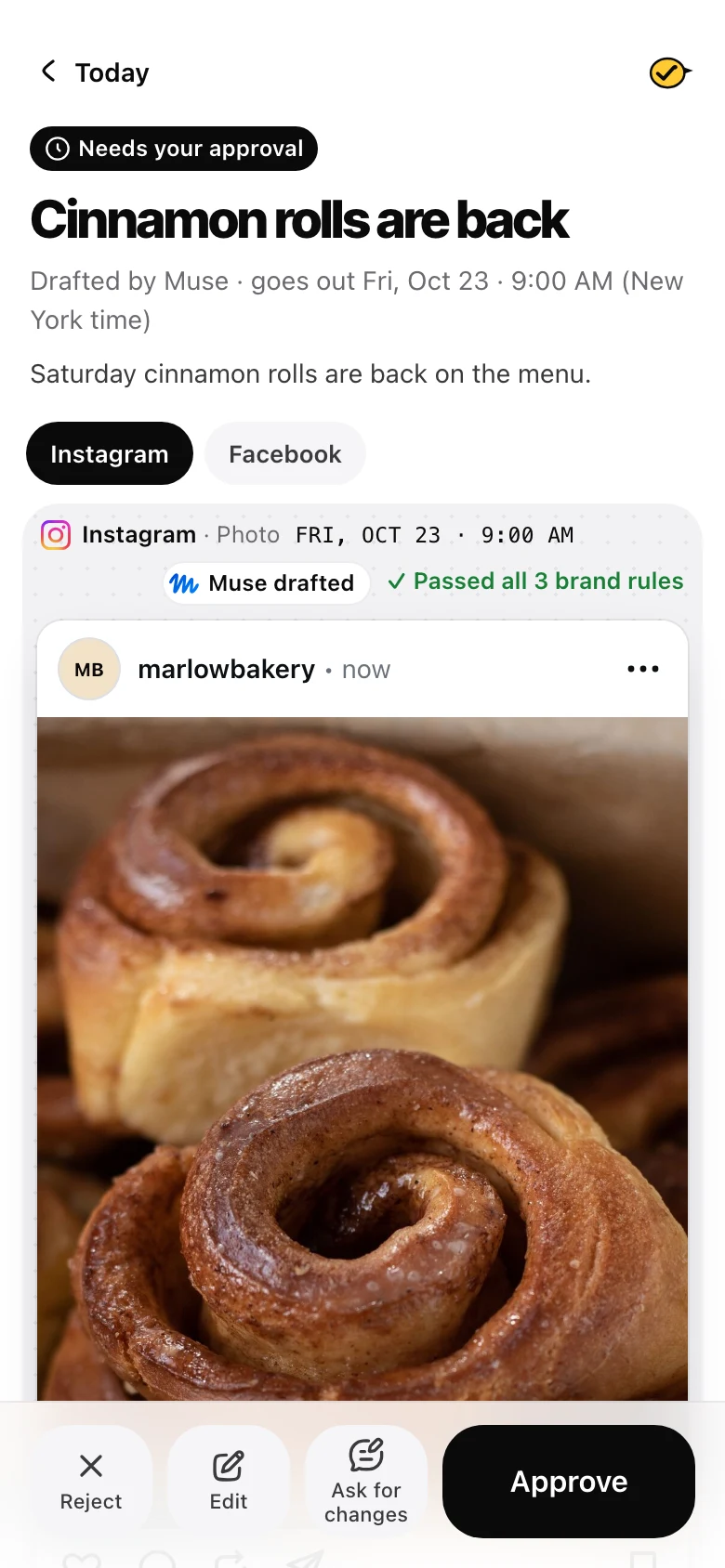
On posting, the Muse for Business page says "Nothing publishes, sends or spends without your approval". Meta does not list what the Facebook and Instagram connectors can publish, so treat Muse as a drafter that asks first.
Where Muse's approval has a gap
Muse's approval depends on your settings. Meta's connector guidelines sort every action into three kinds:
| Kind of action | When Muse asks | Your choices |
|---|---|---|
| Read (look something up) | Each use, until you pick Always allow | Allow once, Always allow, Deny |
| Write (change or create something) | Each use, until you pick Always allow | Allow once, Always allow, Deny |
| Sensitive write (a purchase, an email) | Every time | Allow once, Deny |
So a normal write can be set to Always allow, and after that Muse stops asking. Muse's approval help page also offers Allow for this task, which stops the questions until that task ends. Meta decides which actions count as sensitive when it reviews a listed connector. A custom connector is not reviewed, and Meta does not say how its actions are sorted. If a posting tool counts as a normal write and you tap Always allow once, later posts can go out without a question.
Two ways to stay safe:
- In Muse, go to Settings, then Permissions, and set Connectors to Always ask (Meta help). When it asks about a posting tool, tap Allow once, not Always allow.
- Use a tool where the post waits for you inside the tool itself, whatever the AI app's settings say.
The second one is why I built Yaybird the way I did. Yaybird joins Muse as a custom connector, the kind Meta does not review, so the check has to live in Yaybird. When Muse, Claude or ChatGPT sends a post to Yaybird, it waits for a person's approval. Only a person can approve it (from Muse, that happens in Yaybird), and the publisher only sends posts that were approved. Always allow in Muse cannot change that. The one exception is a switch you turn on yourself: "Post on its own" for a brand, which is off by default and still holds back any post a brand rule catches. The setup is on the Muse setup page, and you can approve posts from your phone.
Does Meta AI post my chats?
Often this is what people really mean. No: Meta's help center says "Prompts with Meta AI are visible only to you" (Meta help), and Meta's launch post for the app said nothing goes to the feed "unless you choose to post it" (Meta).
What does become public:
- AI videos (vibes) you post to the Meta AI and Vibes feed. You can remove them later (Meta help).
- Your Meta AI profile: name, username, bio and picture.
- A chat you share as a link. Anyone with the link sees the chat up to that point, and the link does not expire. Delete it from the chat's menu with Delete link (Meta help).
In 2025 many chats on the app's public feed looked like they were shared by mistake (Mozilla Foundation), so check before you tap share.
If you meant whether Meta trains its AI on your public posts, that is a separate question, answered in Meta's Privacy Center.
If you want an AI to post for you
- In the US or Canada: Muse can draft and ask before it acts. Set its permissions to Always ask.
- Anywhere else: Claude and ChatGPT can draft posts and send them to a scheduler, where you approve them.
- Either way: Instagram only lets apps post to a professional account, and Facebook posts go to a Page, not your personal profile.
Questions
Is Muse the same as Meta AI?
No. Meta AI is the assistant inside Facebook, Instagram, Messenger, WhatsApp and the Meta AI app. Muse is a separate agent app (the Muse app, muse.ai or a WhatsApp chat) that can take actions for you through connectors. Both come from Meta.
Can Meta AI schedule my Instagram posts?
No. It can write a 30-day content plan and captions, but it has no scheduling step. Schedule in Meta Business Suite yourself, or use a scheduler your AI app can send drafts to.
Will Meta AI post in my Facebook group?
Not under Meta's current help page. A group's AI answers people in one-to-one chats and "won't interact in the group directly". It is on by default in eligible groups, and admins can turn it off. News stories from 2024 described an older version that answered unanswered posts after an hour.
Can I use Muse outside the US and Canada?
Not today. Meta says Muse is available to people 18 and over in the US and Canada, and gives no date for other countries. Elsewhere, Claude and ChatGPT can draft posts for you through a scheduler.
Drafted with AI from our research, fact-checked against the platforms' docs and our code, and reviewed by Hamza.

About the author
I build Yaybird, where your AI writes the posts and you approve them on your phone.