Can ChatGPT post to social media?
By HamzaPublished
In short
Not on its own. ChatGPT has no post button and no access to your accounts until you give it some. The reliable way is an app you connect to ChatGPT that posts to each platform the official way, and a good one waits for you to approve each post before it goes live.
Can ChatGPT post to social media on its own?
No. ChatGPT can write your posts, but it has no post button and holds no keys to your Instagram, LinkedIn or TikTok. A platform only lets an app publish after you connect your account to that app. So the question "can ChatGPT post to social media" really means: which tool does the posting, and who checks the post first.
There are three ways a post written in ChatGPT gets out:
- You copy and paste it. Free, works everywhere, and you are the approval step.
- An app connected to ChatGPT. A scheduling tool you sign in to once per platform. ChatGPT hands it the post, the tool publishes. This is the reliable way.
- ChatGPT's cloud browser. In ChatGPT Work, on paid plans other than Go and in supported regions, it can use its own browser, sign in to sites and click through steps. It took over from agent mode, which OpenAI says is no longer available. OpenAI says some sites block automated browsers and that it asks you before hard-to-reverse actions. I have not tested it on the social apps, so I can't tell you it works there. OpenAI itself says to prefer a connected app when one does the job.
Why scheduled tasks don't post for you
Scheduled tasks run a prompt at a time you pick and notify you. They can use connected apps such as Gmail, Slack and GitHub, and an action that sends a message or changes data may pause until you approve it. On Free, tasks run in loose windows like "morning", and exact times need a paid plan.
So a task can remind you to post, or draft one each Monday. It is not a publisher. If you want a post to go out Friday at 9:00, set that time in the tool that publishes. It goes out then even if ChatGPT is closed.
Which ChatGPT plans can connect a posting tool
This is what OpenAI's help pages say on October 22, 2026:
- Business, Enterprise and Edu: you can connect a custom MCP server with write actions, on the web only (not mobile). On Business only admins and owners can add one. On Enterprise and Edu, admins can also let chosen members do it. It is added from Plugins in the sidebar: the + button, then Add custom MCP server. Developer mode is no longer needed first.
- Pro: the same page says Pro can connect a custom server with read and fetch permissions only. It doesn't mention Plus, Go or Free.
- Apps from ChatGPT's directory: the plugin directory is open on every plan, but whether you can install a given app depends on the app, your plan and your region.
Yaybird is not in ChatGPT's directory yet. Today it connects as a custom server on Business, Enterprise or Edu, and the setup steps are on our ChatGPT page. On a personal plan, Claude works on its free plan, which allows one custom connector.
What each platform needs from your account
The tool does the posting, but each platform decides what kind of account a tool may post to. Get this wrong and the first post fails. Here is what each one asks:
| Platform | Account you need | Worth knowing |
|---|---|---|
| A professional account, Business or Creator. Meta's publishing API works only with professional accounts. | At most 5 hashtags a post. Yaybird counts the first comment's too. A story shows no caption. | |
| A Page where you are an admin or editor. Personal profiles can't post through the API (Zernio's docs). | Stories: one 9:16 photo or video, no caption shown. | |
| Threads | An Instagram professional account with Threads on, the way Yaybird's posting partner connects it (Zernio). | 500 characters, one topic tag, threads of up to 25 parts. |
| X | Any account. | 280 characters on a free account. Every link counts as 23. |
| TikTok | Any account. | A photo post's caption takes 4,000 characters, a video's 2,200. If every post from a tool comes out private, the usual cause is that the tool has not passed TikTok's audit: "All content posted by unaudited clients will be restricted to private viewing mode." |
| YouTube | A channel on your Google account, or on a Brand Account you own or manage. | Videos over 15 minutes need a verified account. Being an editor only in YouTube Studio is not enough to connect a Brand Account's channel (Zernio). Yaybird posts a first comment, but you pin it in YouTube Studio. |
| Your profile, or a company page where you have an admin role, such as Administrator or Content admin. | Profile and page are separate. Pick the one you mean when you connect. 3,000 characters. | |
| Any account with at least one board. | A pin must go to a board. With none, Yaybird holds the pin and tells you to make one, instead of guessing. | |
| Bluesky | An app password made in Bluesky's settings, not your main password. | 300 characters. |
| Google Business Profile | A verified location. | Posts on an unverified profile stay Pending and don't show. A phone number Google can't tie to the business can get a post rejected. |
Two more traps. Instagram, TikTok, YouTube and Pinterest need a photo or video, so a text-only post is refused there. And a link in an Instagram or TikTok caption can't be tapped, so put it in your bio.
How you approve a post before it goes live
ChatGPT has its own confirm button, and it is easy to mistake it for an approval. It asks whether ChatGPT may use the app for this action. You set how often it asks under app permissions, and "Allow all actions", where an app offers it, can skip it. It approves the tool call, not the post. Once you confirm, whatever the tool does next is up to the tool.
What you want is a rule in the tool itself: nothing goes live until a person approves that exact post. This is why I built Yaybird. ChatGPT can only save drafts. Yaybird only publishes posts a person made or approved, and nothing in the chat can change that. The one exception is yours to make: a brand's auto-approve, off until you turn it on in Yaybird's settings.
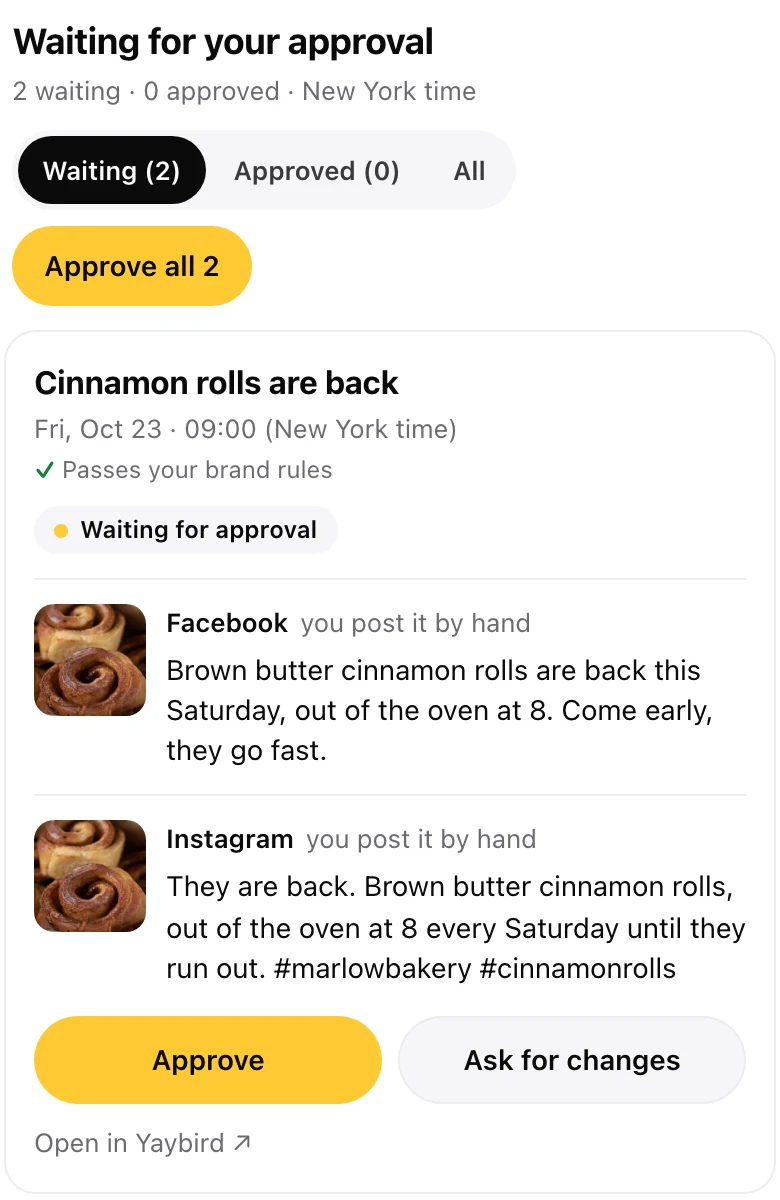
In ChatGPT, after it drafts your posts, Yaybird shows them in one list right in the chat:
- Each post with its caption for every platform, its photos or video, its time and what your brand rules found.
- Approve and Ask for changes on each one, and a filter for Waiting, Approved and All.
- Approve all for the posts that pass every check. It asks once, "Approve 3 posts? Each goes out at its own time."
- Unapprove on an approved post, if you change your mind before it goes out.
Your click carries a one-time key that ChatGPT never sees. It works for 30 minutes, for that post as you saw it. If the post changed since, the approval is refused, so you never approve a version you didn't read. A video gets Approve only once it has loaded in the card. One that won't load gets a link to watch and approve in Yaybird. A post that missed its time, or is due in the next 30 minutes, asks you when it should go.
The approve buttons appear only to people allowed to approve, on a connection that can draft. A read-only connection, or a teammate who can only view, gets a link to the post's page instead. And if ChatGPT changes what a post says or shows after you approved it, it goes back to waiting for you. More on that on the approvals page.
When it doesn't work
- ChatGPT doesn't use the tool. Picking an app applies to one message. Mention it with @ in the message that asks for the post.
- It worked yesterday, now every call errors. OpenAI keeps a frozen copy of a custom server's tools. When the server changes, an admin refreshes it in Workspace settings.
- ChatGPT says it posted, but nothing is there. A post is live only once the platform confirms it and gives back a link. Ask for the link. Yaybird marks a post posted only when the platform confirms it went out, and shows the live link.
- Instagram refuses. The account is personal. Switch it to professional and connect again.
- TikTok posts are private. See the audit line in the table.
- A pin fails. The account has no board yet.
Questions
Can ChatGPT schedule Instagram posts?
Not by itself. A scheduled task in ChatGPT runs a prompt at a set time, it does not publish. To schedule a post, connect a tool that holds your Instagram account and posts at the time you set, even with ChatGPT closed.
Can ChatGPT post to my Instagram story?
Only through an app that supports stories. A story is one 9:16 photo or video, and it shows no caption, so whatever caption ChatGPT writes is not shown on it.
Can I do this on the free ChatGPT plan?
Not with a custom connection. OpenAI puts full support, posting included, on Business, Enterprise and Edu. Apps in ChatGPT's own directory depend on the app, your plan and your region.
Does ChatGPT post my chats or pictures anywhere?
No. Nothing reaches your social accounts unless you connect an app to them, or sign in to a site in ChatGPT's cloud browser yourself.
Drafted with AI from our research, fact-checked against the platforms' docs and our code, and reviewed by Hamza.

About the author
I build Yaybird, where your AI writes the posts and you approve them on your phone.