Instagram hashtag limit: does the first comment count?
By HamzaPublished
In short
Instagram allows 5 hashtags on a post or Reel, down from 30. It announced the change on December 18, 2025 and rolled it out gradually. Its help center sets the cap at 5 "on a post" and says that past 5 "your comment won't post", so count your first comment's hashtags toward the same 5.
The Instagram hashtag limit is 5 per post
You can use 5 hashtags on an Instagram post or Reel. It used to be 30. Instagram announced the change on December 18, 2025 and rolled it out gradually. And going by Instagram's own help center, the first comment counts: the help center says you can use "up to 5 tags on a post", and if you go past 5, "your comment won't post". So 3 in the caption plus 3 in the first comment is 6, one too many.
Does the first comment count?
The articles you'll find disagree here, and Instagram's own two sources word it differently:
- The @creators announcement says Instagram will lower the number of hashtags "you can include in a caption for a reel or post" to 5. That reads as a caption rule.
- The help center says you can add hashtags "in the caption or comments of your post", then sets the cap at 5 "on a post", and warns that a comment that takes you past it won't post.
The help center is Instagram's reference page, it's the stricter reading, and it's the only one of the two that mentions comments. So I treat it as 5 across the caption and your own comments together. If you put 5 in the caption, put none in the first comment.
The first comment trick came from the 30 days, when people kept captions clean and put 30 tags in a comment. With 5 counted per post, it buys you nothing.
What Instagram's sources say, side by side
| Source | What it says |
|---|---|
| Help center: Use hashtags on Instagram | Up to 5 tags on a post. More than 5 and "your comment won't post". |
| @creators on Threads, Dec 18, 2025 | Up to 5 hashtags in a reel or post, rolling out gradually. Fewer, targeted tags work better than many generic ones. |
| Instagram API, media reference (updated Sep 28, 2026) | Captions: 2,200 characters, 30 hashtags, 20 @ tags. |
| Instagram API, error codes | The caption error, 2207010, gives the same 30 hashtags. Error 2207040 is more than 20 @ tags. |
| Instagram API, hashtag search | 30 unique hashtags searched per 7 days. A different limit: it's about looking hashtags up, not posting them. |
Why the API still says 30
Meta's developer docs, which scheduling tools read, still list 30 hashtags per caption. The media reference page was updated on September 28, 2026 and still says 30. None of the pages I read on October 22, 2026 mention the 5 cap. Some tools say the API still accepts 30 in practice. I haven't tested that, and Meta doesn't say whether the 5 cap applies to posts made through the API.
My take: the app's rule is the one your audience sees, and a tool that posts 6 hashtags is betting on a gap Meta can close any day. Stay at 5, whatever posts it.
The same docs also cap @ mentions at 20 per caption, with their own error code (2207040). If you tag a lot of collaborators in one caption, that's the other number to watch.
How it got here
- February 2024: some people saw a 5 hashtag cap in the composer. Instagram told Social Media Today it was a glitch.
- November 2025: some accounts saw "You can only add 3 hashtags to your caption" (Daily Jang). Social Media Today later called the 3 cap Instagram's most recent experiment. If you saw "3", that was most likely that test.
- December 18, 2025: Instagram announced 5 for posts and Reels.
How to stay under 5
- Count the caption and the first comment together. Five in all.
- Pick tags that say what the post is about. Instagram's own advice is to skip generic ones like #reels or #explore, which it says don't help you appear in Explore.
- If a comment won't post, count again. A sixth tag is the first thing to check.
- If a tool posts your first comment for you, open the post after it goes live and check the comment is there. A failed comment may not show up as an error in the tool.
You can paste a caption into the free post preview to count its hashtags and see how it looks on Instagram before you post.
How Yaybird counts them
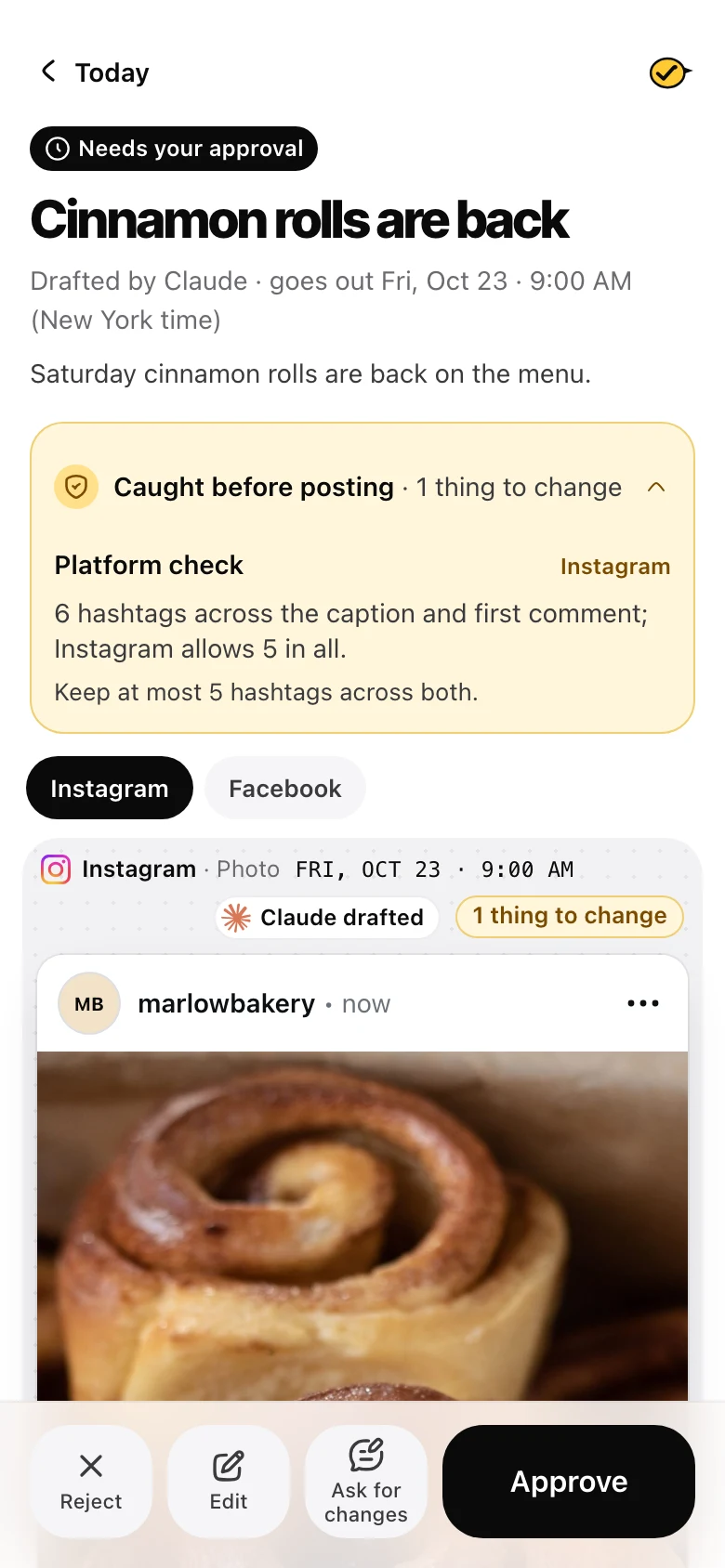
I built Yaybird so an AI assistant can draft your posts and you approve them. When I added first comments, I made the check count hashtags in the caption and the first comment together, because that's the help center's reading. Three in each gets this before anything is sent:
6 hashtags across the caption and first comment; Instagram allows 5 in all.
The fix it gives is "Keep at most 5 hashtags across both." An assistant's draft with 6 is refused, and your own post can wait as a draft until you fix it. It also caps @ mentions in the caption at 20, the number in Meta's API docs. One honest gap: our publisher reports nothing back about the comment itself, so Yaybird says the comment was sent, not confirmed. These checks sit next to your own brand rules, and you still approve each post before it goes out.
Questions
Can I still use 30 hashtags on Instagram?
No. Instagram lowered the limit to 5, announced on December 18, 2025 and rolled out gradually. Its help center now says up to 5 tags on a post. The 30 you still see comes from older articles and from Meta's developer docs, which still say 30.
Does the 5 hashtag limit apply to Reels and carousels?
Yes. Instagram's announcement says 5 hashtags in a reel or post, and a carousel is one post with one caption.
Is there a way around the 5 hashtag limit?
Not one Instagram supports. Moving the extra tags to a comment was the old trick, and the help center's wording puts comments under the same 5. Pick the 5 that say best what the post is about.
Do hashtags still help reach on Instagram?
A little, as labels. Instagram says fewer, more targeted hashtags can improve your content's performance and help people interested in your topic find you, and that generic ones like #reels or #explore don't help you show up in Explore.
Drafted with AI from our research, fact-checked against the platforms' docs and our code, and reviewed by Hamza.

About the author
I build Yaybird, where your AI writes the posts and you approve them on your phone.