Can Perplexity post to Instagram or other social media?
By HamzaPublished
In short
Not by itself. Perplexity has no built-in way to post to Instagram, LinkedIn or X, but on Pro, Max or Enterprise you can add a posting tool as a custom connector, and that tool does the publishing. Perplexity Computer can also click through a site in a browser, but that spends Computer usage, and LinkedIn's rules ban bots that create posts.
Can Perplexity post to Instagram on its own?
No. Perplexity can research and write your posts, but it has no Instagram, LinkedIn or X connection of its own. When people ask whether Perplexity can post to Instagram, the honest answer is: only through something else that holds your account. There are three ways a post written in Perplexity gets out:
- You copy and paste it. Free, works on every plan and every platform.
- A posting tool added as a custom connector. You connect your accounts to the tool once, add the tool to Perplexity, and Perplexity hands it the post. A good one publishes through each platform's official API. Perplexity's March changelog put this on Pro, Max and Enterprise.
- Perplexity Computer or Comet clicking Post for you. Perplexity's help says Computer can drive a browser and log into a site, and Comet's assistant can act on websites. We haven't tested either on the social apps, so I can't tell you it works there.
The browser route has two costs. Money: Computer uses credits (100 credits is $1; paid Pro plans get some Computer usage each week first). In Comet, Work mode runs Computer and uses credits, while Search mode and Ask chats don't. Rules: LinkedIn's User Agreement, section 8.2, says you may not "use bots or other unauthorized automated methods" to "create, comment on, like, share, or re-share posts". A connector that posts through the official API is the safer way.
Which Perplexity plans can add a posting tool
- Free: no custom connectors. Perplexity's troubleshooting page says custom MCP servers are limited to Pro, Max or Enterprise.
- Pro and Max: yes, for your own account.
- Enterprise: members can add one only if an admin turns on "Allow members to add custom connectors", which is off by default. An admin can also add one and share it with the whole organization.
The menu moved in October. Perplexity merged Connectors and Skills into one Plugins page in the sidebar (what moved). A custom connector is now Plugins > Add custom > Connector > Add MCP connector, then Remote. If you don't see Plugins yet, it's still under Customize > Connectors. Guides that start from Settings > Connectors describe an older layout. The Yaybird version, with its address, is on our Perplexity setup page.
Two things trip people up after it's added:
- Pick the connector in the chat. Perplexity's troubleshooting page says some surfaces need it chosen per chat: use the connector picker or an @ mention, or in Computer type / and pick it under Plugins.
- Check your sources. If they're set to Web-only, Academic or Social, Perplexity won't call your connected apps. That Social option is a search setting, not a way to post.
Perplexity's approve card doesn't approve the post
Perplexity asks you to approve consequential writes before they run. Its August 24 update added per-tool settings: set a tool to Always ask, then approve one action, allow the tool for the rest of the thread, or deny it. A tool set to Allow runs without asking (Perplexity documents these settings for its Microsoft 365 connector). The same update says "recurring runs inherit thread-level grants". So once you allow a tool in a thread and turn that thread into an automation, later runs can use it without asking.
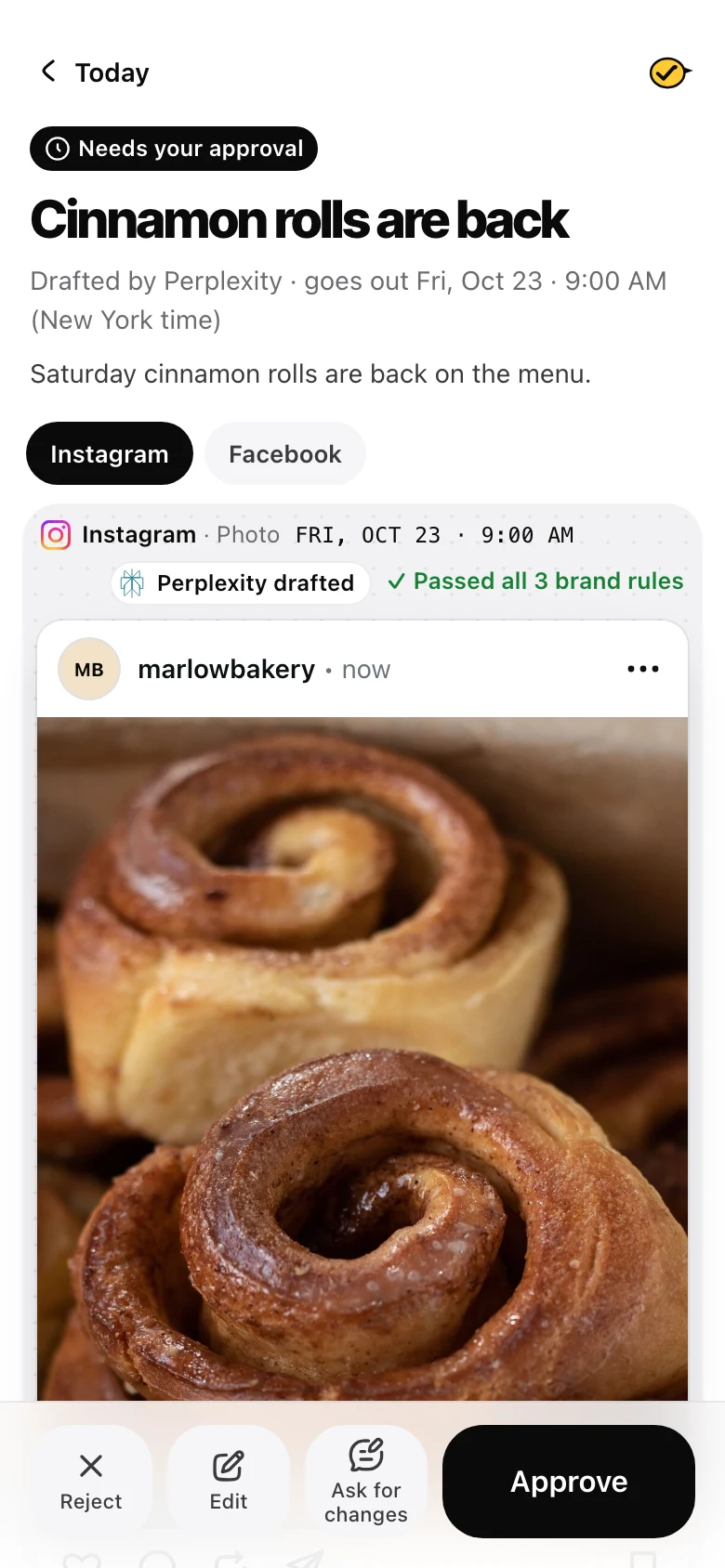
That card approves a tool call, not a post. What happens after you tap it is up to the tool, and many posting tools publish right away. What you want is a rule in the posting tool: nothing goes live until a person approves that exact post.
This is why I built Yaybird. With Yaybird, Perplexity can only save drafts. Yaybird publishes only posts a person made or approved, unless you turn on a brand's auto-approve yourself, which is off by default. One difference from Claude and ChatGPT: Yaybird draws approve buttons in the chat only there. In Perplexity, Yaybird hands back a link to each draft's approval page, and tells you when a post waits, by email or a push on your phone, as you choose in Settings. You approve there.
Don't make Scheduled Tasks your publisher
Perplexity's Scheduled Tasks are good for "draft three posts every Monday". They are not a clock you can trust for 9:00 sharp:
- They run no more often than once an hour, and can start a few minutes late.
- Each run uses credits. Out of credits, the run is skipped, and after repeated skips the task pauses until you turn it back on.
Set the post's time in the posting tool instead. It publishes at that time even if Perplexity is closed.
What each platform needs
The posting tool does the work, but each platform decides which accounts a tool may post to. Instagram needs a professional account, Facebook a Page, and a LinkedIn company page an admin role. Instagram, TikTok, YouTube and Pinterest need a photo or video. These are the same whichever assistant you use, so I keep the full table for 10 platforms in Can ChatGPT post to social media?.
When it doesn't work
- No custom connector option. You're on Free, on Enterprise without your admin's permission, or on a device where it isn't out yet (Perplexity says some connectors reach web, desktop and mobile at different times).
- Sign-in window closes or hangs. Allow pop-ups and third-party cookies for perplexity.ai, or try a private window with extensions off. With Yaybird you can also choose API key instead of OAuth.
- New tools don't show up. Disconnect the connector and connect it again so Perplexity reads the tool list again.
- Perplexity says it posted, but nothing is there. Ask for the live link, or check the posting tool. Until there's a link to the post, don't count it as posted.
Questions
Can Perplexity post to Instagram for free?
Not through a connector, since custom connectors need Pro, Max or Enterprise. Perplexity's plan table also gives the free plan no Comet Assistant browser tasks, though some free US accounts can try Computer on the web with some included turns. On Free, copy the caption and paste it into Instagram yourself.
Can Comet post on LinkedIn for me?
Comet's assistant can act on websites, like clicking and filling forms. Check the mode first. Perplexity says Work mode hands your request to Computer and uses credits, and Search mode doesn't. We haven't tested it on LinkedIn, and LinkedIn's User Agreement bans bots or other unauthorized automated methods that create posts.
Can Perplexity schedule social media posts?
Its Scheduled Tasks can draft a post every Monday, but they run at most once an hour, can start a few minutes late and skip a run when credits run out. Set the post's time in the posting tool, which publishes it even with Perplexity closed.
Does Perplexity get my Instagram password?
Not with a posting tool. You connect Instagram inside that tool once, and Perplexity only talks to the tool. Perplexity also says Comet never has access to your passwords, but a browser agent acts in a browser where you are signed in to Instagram.
Drafted with AI from our research, fact-checked against the platforms' docs and our code, and reviewed by Hamza.

About the author
I build Yaybird, where your AI writes the posts and you approve them on your phone.