Mistral Le Chat is now Vibe. Can it post to social media?
By HamzaPublished
In short
Not on its own. Mistral renamed Le Chat to Vibe on May 28, 2026, and none of the connectors Mistral features posts to social media. On every plan, Free included, the account's administrator can add a posting tool as a custom MCP connector. Vibe asks before a connected tool creates or posts something, but that approves the tool's action, not the post.
Can Mistral Le Chat post to your social accounts?
No, not on its own. Mistral Le Chat is now called Vibe, and it can write your posts, but none of the connectors Mistral features posts to Instagram, LinkedIn, TikTok or X. To publish from Vibe, you add a posting tool as a custom connector. You connect your social accounts to that tool once, and the tool publishes. Vibe asks before the tool acts. That question is about the tool's action, not about your post, so check what the tool does next.
Le Chat became Vibe in May 2026
Mistral announced the new name on May 28, 2026: "Le Chat is now Vibe". Its help center says it is the same URL, chat.mistral.ai, with the same login, and nothing you made is lost.
The screens changed again in September. Mistral merged the Chat and Work tabs into one, starting with Free, Pro and Team accounts. Enterprise organizations move later, when their admin chooses. So a guide that says "open the Context tab" or "Intelligence" shows an older layout. Today, connectors are on the Connectors page in the sidebar.
Which plans can add a posting tool
Mistral's pricing page lists "Custom MCP connectors (beta)" on all four plans: Free, Pro, Team and Enterprise. The catch is who adds it. Mistral's connector guide says it needs an administrator:
- Free, Pro and Student: you own the account, so you are the administrator. You can add it.
- Team and Enterprise: ask your admin. Admins can also block MCP connectors for a workspace, or allow only some of a connector's tools.
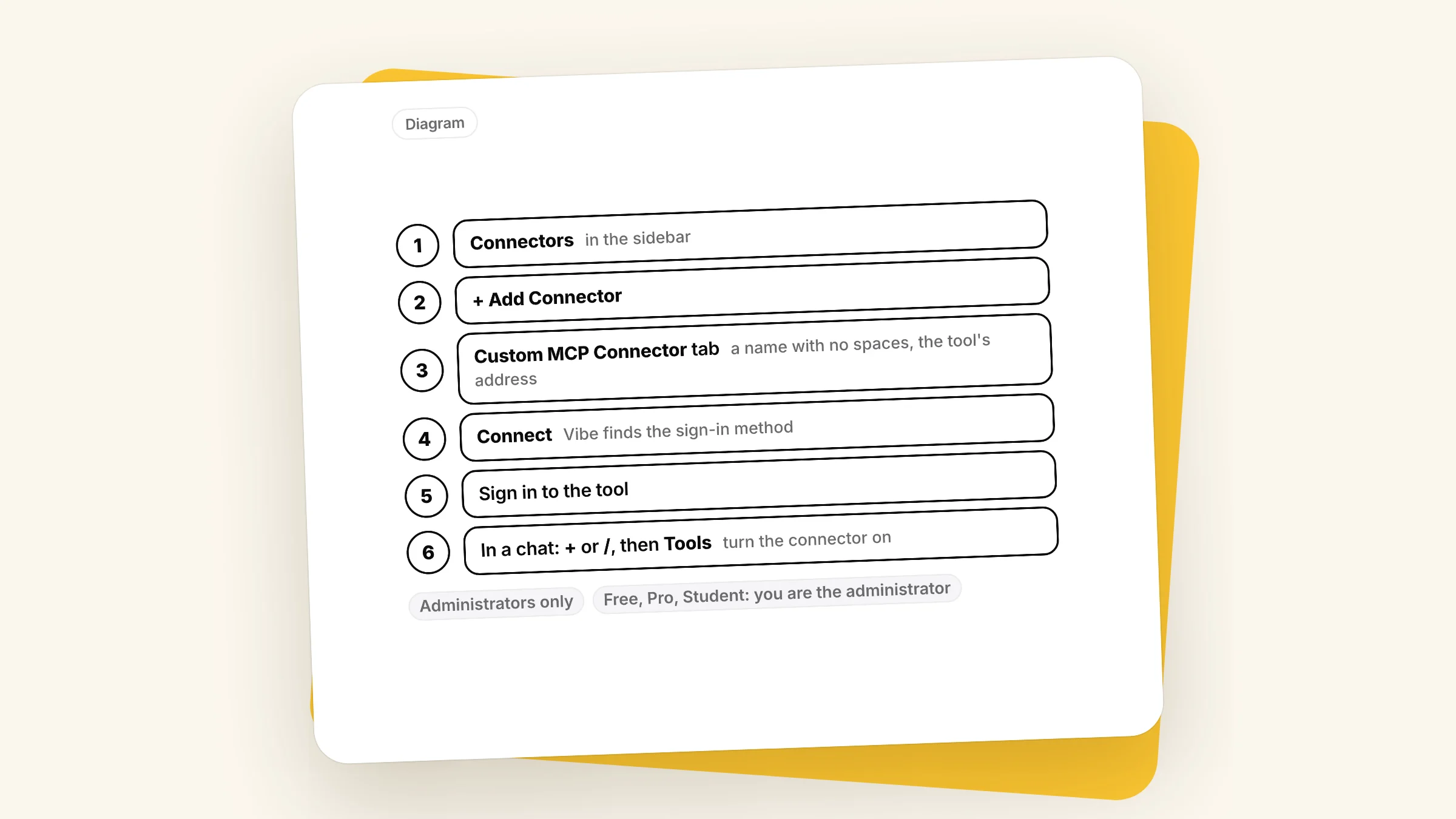
The path is Connectors, then + Add Connector, then the Custom MCP Connector tab. You give it a name with no spaces, paste the tool's address and choose Connect. Vibe finds the sign-in method itself. Then, in a chat, choose + or type /, open Tools and turn the connector on. For Yaybird's address and each step, see our Mistral Vibe setup page.
Vibe asks first. That is not a post approval.
Before Vibe uses a connected tool to create, send or post something, it stops and asks. You get three choices:
- Continue: do this one action. Vibe asks again next time.
- Always allow: don't ask again for this action in this session.
- Decline: cancel it.
You can also turn on Always allow for one action at a time, so Vibe stops asking for it: Connectors, then My Connectors, open the connector, then the Functions tab. That setting is yours only and doesn't change your teammates' settings.
Here is the trap. If the tool publishes right away, Continue means "post it now". And scheduled tasks run when you are not there, so Mistral tells you to set Always allow for the actions they need (its own tip is to keep unattended runs to read-only work like summaries). A weekly "write and post my LinkedIn update" task with a tool that publishes right away means nobody reads the post first.
What you want is a rule in the posting tool itself: nothing goes live until a person approves that exact post. This is why I built Yaybird. With Yaybird, Vibe can't publish: saving a post only saves a draft, so Continue, or even Always allow, saves a draft. A post goes live after a person approves it, unless you turn on a brand's auto-approve yourself, which is off by default. Yaybird shows approve buttons inside the chat only in Claude and ChatGPT. In Vibe, Yaybird hands Vibe a link to each draft, emails you (or sends a push, if you turned it on), and you approve the post there.
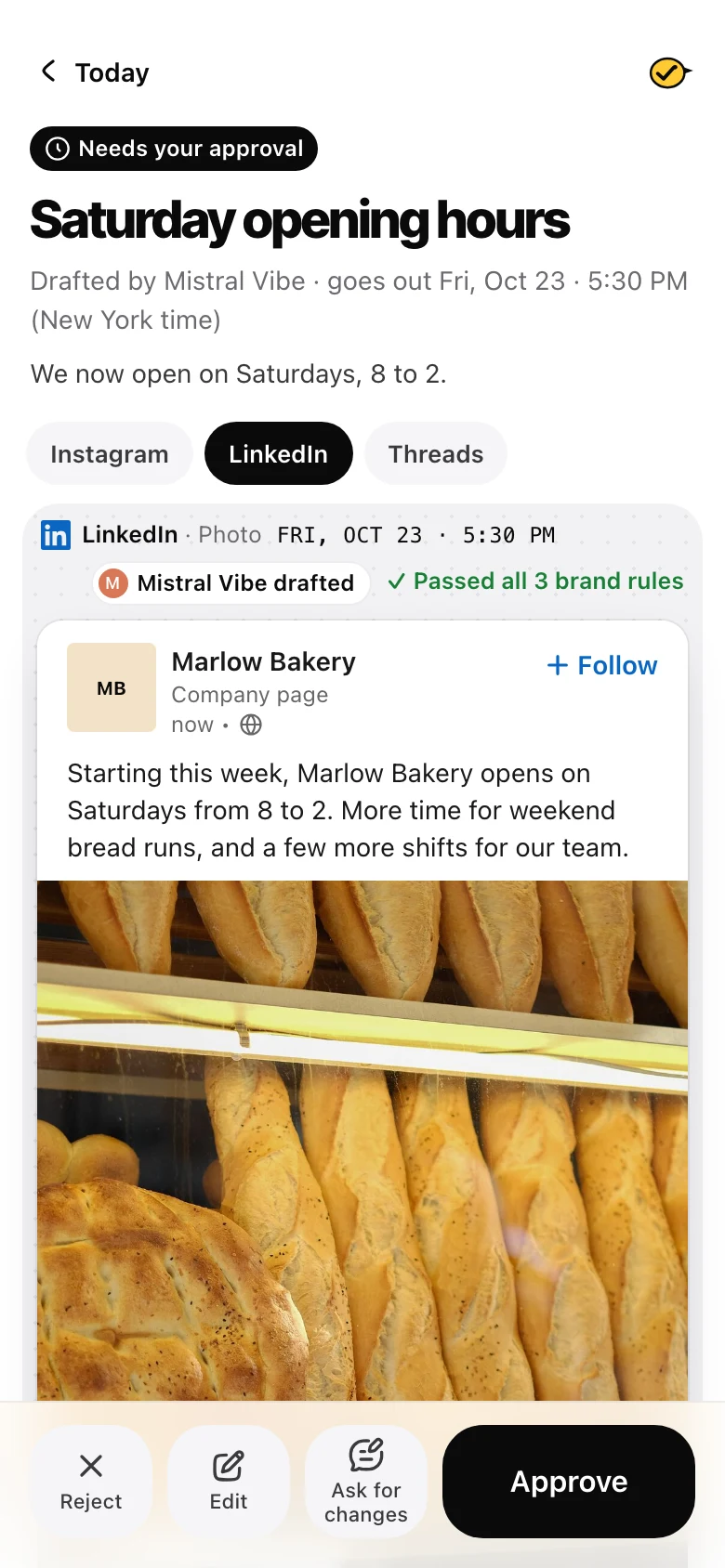
What Vibe can post on each platform
The posting tool does the work, so the platform rules are the tool's rules:
- LinkedIn, Facebook, Threads, X and Bluesky take a text-only post. Vibe can write it and hand it over as it is.
- Instagram, TikTok, YouTube and Pinterest need a photo or video. Mistral's guide doesn't say that a picture you attach in the Vibe chat reaches a custom connector. Yaybird takes a public link to the file, or gives you a one-time upload page to open on your phone and pick the photo. The page works once, for an hour.
Each platform also decides which accounts a tool can post to: Instagram needs a professional account, Facebook a Page, a LinkedIn company page an admin role. These are the same whichever assistant you use, so I keep the full table in Can ChatGPT post to social media?.
When it doesn't work
- You can't add a connector. Adding one is for administrators only, and an admin can turn MCP connectors off for a workspace. Ask your admin.
- "MCP connection requires additional information or is invalid". Mistral's troubleshooting list: check the address (some servers use /mcp or /sse at the end), that the server answers over HTTPS, and that you finished signing in.
- New tools don't show up. Vibe's custom connectors don't pick up new tools on their own yet. Open the connector's Functions tab and choose Refresh tools.
- Vibe says it posted, but nothing is there. Ask for the link to the live post, or check the posting tool. Until there is a link to the post, don't count it as posted.
Questions
Is Mistral Le Chat the same as Vibe?
Yes. Mistral says Le Chat is now Vibe, at the same address, chat.mistral.ai, with the same login. Your plan, conversations and settings carried over.
Can I add a custom connector on the free Mistral plan?
Yes. Mistral's pricing page lists custom MCP connectors on Free, Pro, Team and Enterprise. On Free, Pro and Student plans the account owner is the administrator by default, so you can add one yourself.
Can Vibe post to LinkedIn on a schedule?
Vibe's scheduled tasks can run a prompt every week, but a run happens without you there. Mistral says to set Always allow on the tool's actions so the run can finish. Use a posting tool that keeps the post waiting for your approval, or set the time in the posting tool instead.
Drafted with AI from our research, fact-checked against the platforms' docs and our code, and reviewed by Hamza.

About the author
I build Yaybird, where your AI writes the posts and you approve them on your phone.