Does Grok post to X on its own?
By HamzaPublished
In short
No. Grok does not post to your X account on its own, and your Grok chats stay private unless you share a link. It posts on X only from its own @grok account, when someone tags it. To post for you, Grok needs a posting tool you connect, and X's rules say that tool must show you exactly what will be published first.
Does Grok post to X on its own?
No. If you are asking does Grok post to X from your account, it doesn't. Nothing you type into Grok shows up on your profile, and your chats stay private unless you make a share link. Grok posts on X only from its own @grok account, when someone tags it. To post for you, it needs a posting tool you connect yourself.
When Grok does post on X
When someone tags @grok. Grok answers in a public reply from its own account (X's help center contrasts @bot with @Grok, which answers requests itself). Anyone can tag it under your post or photo. News outlets reported that this is how the January 2026 image edits spread: people tagged @grok under other people's photos, and Grok posted the edits as replies. X then limited editing through the Grok account to paid subscribers (Bloomberg), and X Safety said it blocked edits that put real people in revealing clothing, for every user (quoted by Al Jazeera).
When you tag @bot. @bot hands your post to your Grok Bot and posts one short public reply to confirm. xAI's docs say the work stays in the Grok Bot app (xAI). Tagging is not available yet for accounts in the UK, the EU, Australia, Iceland, Liechtenstein or Norway.
Are your Grok chats or images public?
Your chats are private until you tap Share, which makes a public link. xAI's FAQ (its pages now sign as SpaceXAI LLC) warns that a link you post publicly "may be subject to indexing" by Google (xAI FAQ). In August 2025 Forbes reported that a Google search showed more than 370,000 shared Grok chats, made public with no warning to users (Forbes).
We checked grok.com's robots.txt on October 22, 2026: it keeps search engines out of your chat pages, not the share pages. A shared chat we opened that day tells search engines "index, follow". So treat every share link as public. Remove old ones at grok.com/share-links, or use Private Chat, which xAI deletes within 30 days.
Images you make on grok.com or in the Grok app go to X only if you post them; the January edits were public because @grok posted them as replies. xAI's FAQ says you own what you make, and each image carries a Grok watermark you may not remove (Grok FAQ).
Can Grok post to X for you?
Only through something you add. Each way, as of October 2026:
| Route | Posts to your X? | The catch |
|---|---|---|
| Grok on grok.com or in the X app | Not built in. It drafts text you copy | xAI's built-in connectors cover mail, calendars, files, Teams and Salesforce, not X (xAI) |
| Grok Bot with the X plugin | Not listed. It reads | X says the plugin searches posts, reads timelines, checks mentions, trends and bookmarks (X help) |
| Grok Bot clicking Post in its browser | In principle | X's rules ban "scripting the X website" and warn of permanent suspension (X automation rules) |
| X's own MCP server as a custom connector | Yes | You need an X developer app and a public server. X charges $0.015 a post and $0.20 for a post with a link (X API changelog) |
| A scheduler as a custom connector | Yes | Depends on the scheduler: some publish at once, some wait for you |
Custom connectors are open to all Grok users; on Grok Business an admin turns them on first (xAI). xAI says Grok uses a connector's tools automatically when your question calls for them, and doesn't mention asking first.
What X's automation rules say about posting
X allows automated posts. Its automation rules (updated April 2026) and developer policy set the limits:
- Your consent is more than a sign-in. Connecting an app to X "does not by itself constitute sufficient consent". The app must say what it will do, get your OK, and stop when you ask.
- Show the post first. A tool that posts to X must "show exactly what will be published" before it publishes.
- No spam patterns. No automated posts about trending topics, no near-identical posts on one account or across accounts, no misleading links.
- Replies are the strict part. Automated replies go only to people who asked for one. An AI reply bot needs X's written approval. Since February 23, 2026, apps on X's self-serve plans can reply only when the author tagged or quoted them (X API changelog).
- It's your account. X holds you responsible for what the apps you connect do with it.
So the safe way to have Grok post for you is a tool that shows you each post and waits for your yes.
How Yaybird handles this
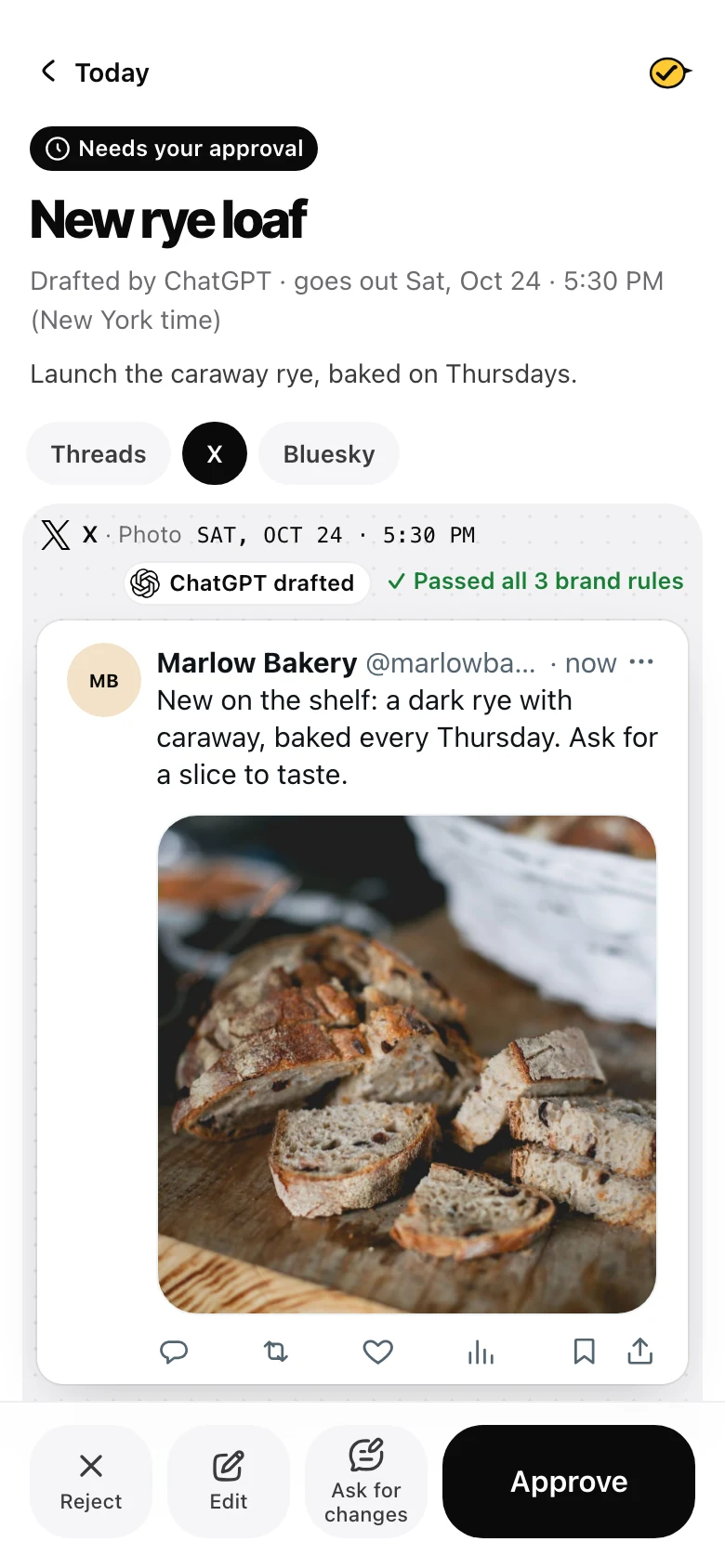
That's how I built Yaybird. It joins Grok as a custom connector on grok.com: Grok drafts the X post, and it waits until a person approves it. Grok can't approve anything, and only approved posts go out. xAI hasn't published every detail of grok.com's sign-in and I haven't run it end to end yet, so the setup page says what to do if it fails. You see the post as X will show it, counted X's way, up to 280 characters with each link as 23 and each emoji as 2. Then you approve it from your phone. A per-brand "Post on its own" switch exists, off unless you turn it on.
Replies wait for a person too, so nothing auto-replies on X. On paid plans X link posts have a monthly cap, since each costs us $0.20 to send. See what X rewards and what to check before you approve.
Questions
Does X use my posts to train Grok?
It can. X's help center says X may share your public posts and your Grok chats on X with xAI for training. To opt out, go to Settings, Privacy and safety, Data sharing and personalization, Grok & Third-party Collaborators, and untick the training option. On grok.com and the Grok app the switch is "Improve the model" under Settings.
Can I stop people tagging @grok to edit my photos?
Partly. News reports in January 2026 said X limited image editing through the @grok account to paid subscribers, and X's Safety account said it blocked edits that put real people in revealing clothing. Social Media Today reported in March 2026 that X added a toggle in the photo upload screen that stops Grok remaking your picture. X's help center does not describe it yet, so check your composer for it.
Does @bot post my Grok Bot results on X?
No. When you tag @bot, it posts one short public reply saying your Grok Bot has the task. xAI says the work and its results stay in the Grok Bot app.
Drafted with AI from our research, fact-checked against the platforms' docs and our code, and reviewed by Hamza.

About the author
I build Yaybird, where your AI writes the posts and you approve them on your phone.