n8n social media posting with a human approval step
By HamzaPublished
In short
For n8n social media posting with approval, put a Send and Wait for Response step (Slack, Telegram or Gmail) right before the node that posts, restrict who can approve, and only post when the answer is an approval, because a timeout resumes the workflow too. Or let n8n hand the draft to a tool that holds it until a person approves it.
n8n social media posting with an approval step
n8n can write a post, send it to you in Slack, Telegram or Gmail, wait for your answer and then post it with its LinkedIn, X or Facebook node. The step that waits is Send and Wait for Response. To make it a real gate, three settings matter: who is allowed to approve, what happens when nobody answers, and whether the node that posts uses exactly the text you approved. n8n.io's GPT-4 and Telegram approval template covers none of them.
The other way is to keep posting out of n8n: the workflow saves a draft in a tool that publishes only what a person approved. I built Yaybird for that, and the free template below does it. Why a prompt like "ask me first" is not enough is in how to approve AI-generated social media posts.
The plain n8n way
Four nodes after your trigger:
- Write the post. An OpenAI or AI Agent node, or a Set node if the text comes from a sheet.
- Ask for approval. A Slack, Telegram or Gmail node with Send and Wait. Response Type Approval, and under Approval Options pick Approve and Disapprove (the default is an Approve button only).
- Check the answer. An IF node:
{{ $json.data.approved }}is true. - Post it. The platform node on the true branch only.
Five traps in n8n's approval step
These come from n8n's docs and, where the docs are silent, from n8n's source code.
1. A timeout carries on. Limit Wait Time "will automatically resume execution" when time runs out. In n8n's code the node then passes on the item it received, with no data.approved field at all. If the platform node comes straight after the wait, a post nobody answered goes out. The IF in step 3 is what stops it.
2. No limit means it waits forever. Without Limit Wait Time the execution waits with no end. Approve Thursday's weekend post the next Tuesday and it posts on Tuesday. Set the limit to the last moment the post still makes sense.
3. Anyone with the link can approve. By default the buttons are links to an n8n page, and Slack's docs say plainly: "anyone who has the link can respond, and n8n can't tell who clicked". A forwarded email is a forwarded approval. Gmail only has link buttons. To limit who can answer:
- Slack: turn on Capture Who Responded, then fill in Restrict Who Can Approve. You also need Interactivity on in your Slack app and its signing secret in the credential, or clicks never resume the workflow.
- Telegram: turn on Approve Within Chat, then fill in Restrict Who Can Approve.
Left empty, either list lets anyone who can see the message answer. Both need your n8n reachable from the internet over HTTPS; on localhost, Telegram falls back to link buttons.
4. After the approval, $json is the answer, not your post. When someone answers, the node outputs { data: { approved, respondedAt } } and your caption is gone from the item. The platform node has to read the text from the node before the approval, by name: {{ $('Write the post').first().json.text }}. Point it at a later AI call and you post something nobody approved. And it asks once per run, built from the first item: three drafts in one run get one message. Send one post per execution.
5. You approve a message, not the post. The reviewer sees text in a chat. Not each platform's version, not the picture, not the account. With n8n's human review for AI tool calls it's the tool's name and its parameters. Approval is approve or decline; to edit first you need the Free Text or Custom Form response type, then map the edited text into the platform node.
Which platforms n8n can post to
| Platform | Built into n8n | What to know |
|---|---|---|
| LinkedIn node, Create post | To post as a company page, LinkedIn must approve your app (n8n's credential guide) | |
| X | X node, Create tweet | Needs your own X developer app |
| Facebook Pages | Facebook Graph API node | A raw API call you build yourself |
| No node: Graph API calls | Two calls (create a container, then publish it), JPEG only, the file on a public URL, 100 API posts per 24 hours (Meta's docs) | |
| YouTube | YouTube node, Upload a video | Google credential |
| TikTok | No node: HTTP Request | Until TikTok audits your app, "all content posted by unaudited clients will be restricted to private viewing mode" |
| Threads, Bluesky, Pinterest | No node | HTTP Request or a community node |
Each one is its own developer app, credential and set of rules. Our platform pages list the rules we check, for example what LinkedIn allows and Instagram's limits.
The Yaybird way: n8n drafts, you approve on your phone
Here n8n's job ends when the draft is saved. The workflow hands it to Yaybird with n8n's MCP Client Tool, and the post waits there until a person approves it (unless you turn on a brand's auto-approve yourself; it's off by default).
- In Yaybird, open Settings > AI apps and, under API keys, create a key that may do Drafts need my approval. It starts with
sk_yb_and is shown once. - Import the template (below), or add an AI Agent node and, under Tool, an MCP Client Tool.
- Endpoint
https://yaybird.com/mcp, Server Transport HTTP Streamable, Authentication Bearer Auth with your key (not MCP OAuth2, see the FAQ). The full steps are on the n8n setup page. - Under Tools to Include, pick Selected:
get_workspace,get_brand,check_post,create_post. The agent needs nothing else.
What changes:
- The traps move out of n8n. The key has no way to approve or publish. Nobody answering means the post waits; it never goes out on a timeout.
- You see the post, not a message. Each platform's preview, with its media, account and time, on the approval page. Approvers get an email, and a push on a phone where they turned push on.
- Checks run before you look.
check_postreturns every problem with its fix (length, links, your brand rules), so the agent fixes them before it saves. - Your approval covers one version. If the agent changes the post after you approve it, it goes back to waiting. Moving it later with nothing else changed is the one exception. If it's still waiting at its time, it doesn't go out: when you approve it, Yaybird asks whether to post now or pick a new time.
- No developer app per platform. You connect your accounts once in Yaybird.
Without an AI agent
If the text is already written (a sheet, a form), skip the agent. n8n's standalone MCP Client node calls one tool as a normal step. Same endpoint and key, Tool create_post, Input Mode JSON, with the field set to Expression:
{
  "title": {{ JSON.stringify($json.title) }},
  "brief": "From the content sheet",
  "scheduled_at": "next_slot",
  "idempotency_key": "sheet-{{ $json.row_number }}",
  "targets": [
    { "platform": "linkedin", "caption": {{ JSON.stringify($json.linkedin_text) }} }
  ]
}
JSON.stringify keeps quotes and line breaks in a caption from breaking the JSON. next_slot takes your next free posting time. With the idempotency_key, a re-run for the same row returns the first post instead of saving a second. If a rule catches the caption, the node fails with the problem and its fix, and nothing is saved.
The free template
Download the workflow (workflow.json), then in n8n paste it onto a canvas or use Import from File. It has no credentials in it.
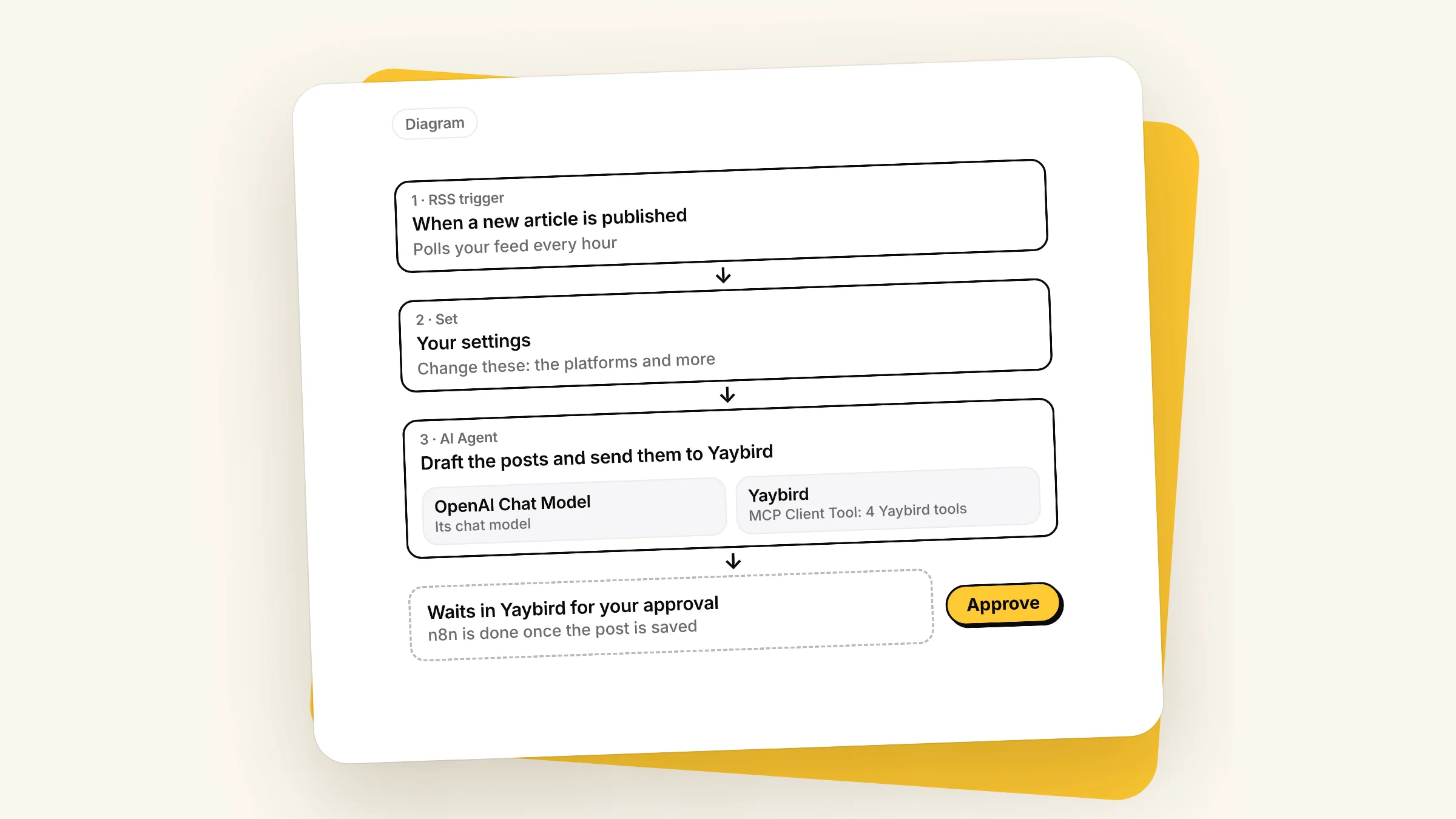
What it does: an RSS trigger fires on each new article, Your settings holds the platforms and the time, and an AI Agent with the Yaybird tool reads your brand rules, writes one post per platform, checks and fixes it, and saves it with the article link as its idempotency key. Sticky notes explain each step and what to change.
To set it up, add your Yaybird key to the Yaybird node and a model credential to the chat model, put your feed URL in the trigger, and click Execute workflow once: a test run takes the first article in the feed, usually the newest. Then approve the post on your phone and turn the workflow on. It only picks up articles published after that.
It drafts text posts, for LinkedIn, X, Threads, Facebook or Bluesky. Instagram, TikTok and YouTube need a photo or video: add add_media to the agent's tools and give it the file's public https link (JPEG, PNG, WebP, MP4 or MOV, up to 100 MB).
Questions
Does n8n have an Instagram or TikTok node?
Not built in. n8n ships nodes for LinkedIn, X, YouTube and the Facebook Graph API. For Instagram you call Meta's Graph API through the Facebook Graph API or HTTP Request node, and for TikTok you call its Content Posting API with HTTP Request. Community nodes and posting services fill the gap too.
Should the MCP Client Tool use SSE or HTTP Streamable?
HTTP Streamable. n8n's docs page for the node still names an SSE Endpoint field, but the node has had a Server Transport setting since version 1.1, with HTTP Streamable the default from 1.2 and Server Sent Events marked deprecated. If your node only shows an SSE Endpoint field, it is the node's first version. Update n8n and add a new MCP Client Tool node: a node already in a workflow keeps its version.
Can I use MCP OAuth2 instead of an API key?
Not on n8n Cloud or an n8n on your own domain. Yaybird's sign-in only returns to the callbacks of the AI apps it lists and to localhost, and n8n's callback is on your instance's own address (/rest/oauth2-credential/callback). Use Bearer Auth with a key.
Can the n8n agent approve its own posts in Yaybird?
No. An API key can read and save drafts, or only read. Neither level has a way to approve, and Yaybird publishes an agent's post only after a person approves that exact version, unless you turn on auto-approve for a brand yourself.
Drafted with AI from our research, fact-checked against the platforms' docs and our code, and reviewed by Hamza.

About the author
I build Yaybird, where your AI writes the posts and you approve them on your phone.